How to Choose a Cloud PACS Zero Footprint Web Viewer in 2026: Buyer's Guide
Choosing a zero-footprint DICOM viewer in 2026 means balancing security, workflow, and cost before you sign. A viewer that lacks HIPAA and GDPR alignment or clean interoperability will slow your radiology reads and create compliance exposure. This guide gives you a concrete checklist to evaluate cloud PACS viewers against.
You will learn what to demand on security, compliance, AI, and image sharing, then see how Medicai's cloud PACS and zero-footprint viewer measure up. By the end, you will know which features matter, how pricing works, and whether Medicai fits your imaging team.
What Is Medicai? A Cloud PACS and Zero-Footprint Viewer Built for Modern Imaging Teams
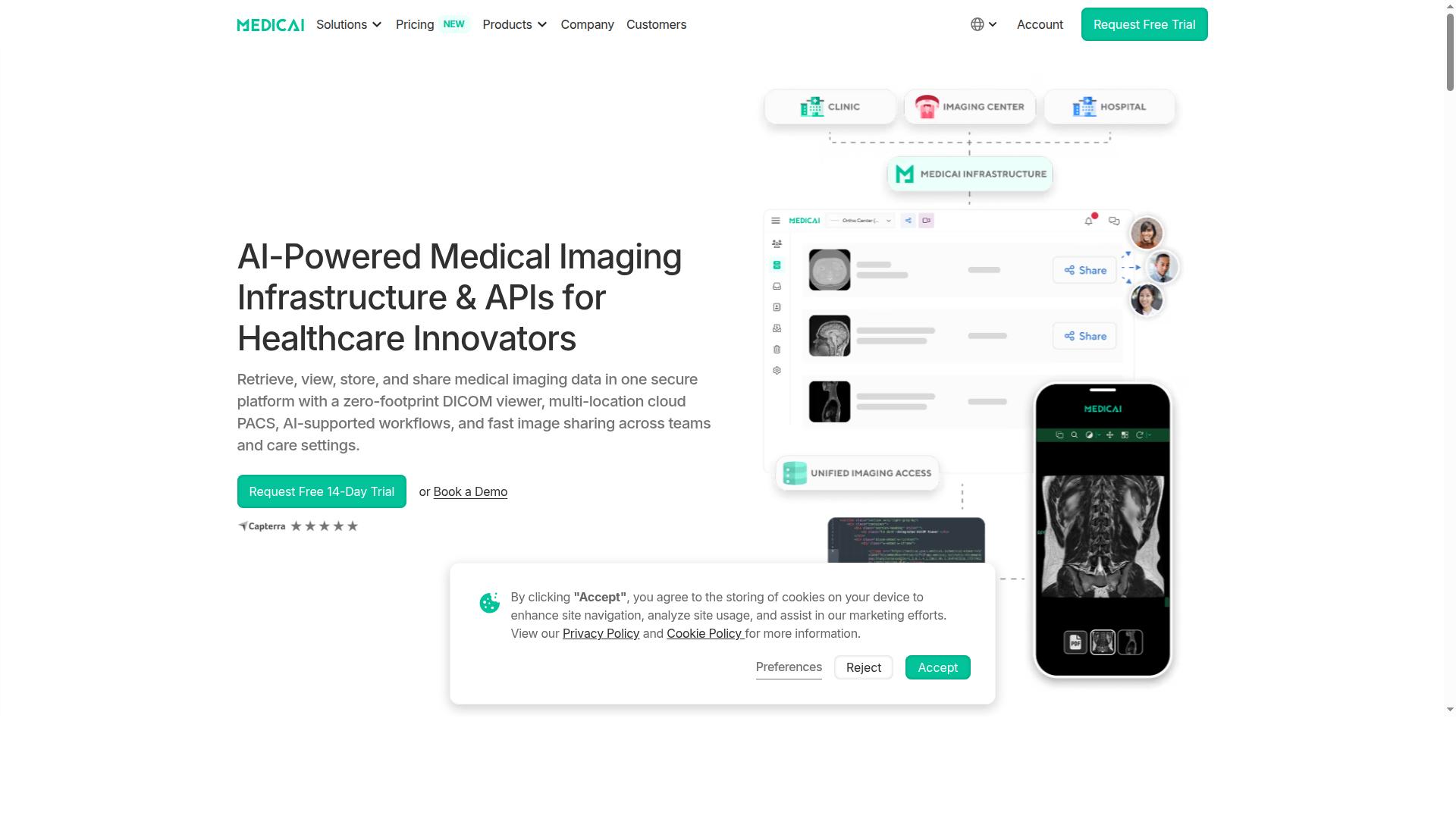
Medicai is a cloud-based medical imaging platform that combines a zero-footprint DICOM viewer with cloud PACS, enabling healthcare providers to retrieve, view, store, and share imaging data in one secure environment. In practice, that means a radiology team can open a study in a browser, review it, and pass it to a referring clinician without installing anything on a workstation.
A cloud PACS moves the image archive and the software that manages it off local servers and into a hosted environment. The zero-footprint web viewer is the access layer: studies open in a standard HTML5 browser session with no desktop client to deploy or patch. For IT teams, that removes a long-standing maintenance burden. For clinicians, it means imaging is available wherever there is a secure connection.
Medicai serves hospitals, imaging centers, and specialty care providers, and it delivers this as Imaging Infrastructure as a Service. The platform also supports multi-location cloud PACS, AI-supported workflows, and fast image sharing across teams and care settings. As a VC-backed healthcare startup, Medicai positions itself around modernizing medical imaging workflows and enabling interoperability.
The core value is simple: one secure place to retrieve, view, store, and share diagnostic imaging, without the friction of installed software. That combination of cloud PACS and a browser-based DICOM viewer is exactly what this buyer's guide asks you to evaluate in 2026.
The 2026 Buyer's Checklist: What to Demand From a Cloud PACS Zero-Footprint Viewer
As imaging teams evaluate cloud PACS and zero-footprint viewers in 2026, a structured checklist helps separate robust platforms from basic viewers. The criteria below reflect what modern radiology and teleradiology teams actually need in daily practice, not marketing claims.
The checklist spans security, compliance, interoperability, workflow, AI, and image sharing. Each area carries specific questions a buyer should put to every vendor before signing. The two subsections that follow break these demands into practical, testable criteria.
Security, Compliance, and Interoperability Criteria
Security and interoperability are non-negotiable in 2026, with buyers demanding HIPAA and GDPR compliance, cleared viewers, and support for DICOMweb, HL7, and FHIR. A zero footprint web viewer handles sensitive diagnostic imaging, so its security posture deserves scrutiny before any workflow discussion.
Start with regulatory clearance. A diagnostic viewer should carry FDA clearance or CE marking for primary diagnosis. General-purpose image viewers without clearance may suit review only, which matters for teleradiology reporting.
Then confirm standards support. The table below summarizes the core criteria and the questions to ask.
| Criterion | Question to Ask |
|---|---|
| HIPAA and GDPR compliance | How is patient data encrypted at rest and in transit? |
| FDA clearance or CE marking | Is your viewer cleared for diagnostic use? |
| OWASP practices | How do you handle vulnerability testing and disclosure? |
| DICOMweb (QIDO-RS, WADO-RS, STOW-RS) | Do you support DICOMweb natively? |
| HL7 v2 and FHIR | Can you connect to our EMR and scheduling systems? |
| IHE profiles (XDS, XDS-I) | Which IHE profiles are implemented? |
| Vendor neutral archive | Can images be exported to a VNA without lock-in? |
Interoperability also protects long-term flexibility. Native DICOMweb support and vendor neutral archive compatibility keep the image archive portable, so data is not trapped in one system.
Workflow, AI, and Image-Sharing Criteria
Beyond security, buyers should evaluate workflow efficiency, AI integration, and seamless image sharing across locations and specialties. A browser-based viewer only earns its place if radiologists can read faster and share studies without friction.
Confirm true zero download access. The HTML5 viewer should open in the browser with no plug-ins or local installs. Ask: "Does the viewer support progressive loading?" Progressive loading lets large studies open quickly while remaining data streams in the background.
Then test diagnostic tooling. Hanging protocols, window level presets, MPR, and 3D rendering with WebGL are baseline expectations for diagnostic imaging. Check how the platform handles transfer syntax and compression, including JPEG 2000, JPEG-LS, lossless compression, and lossy compression policies.
AI is the next checkpoint. Ask: "Can it connect with AI tools?" Look for API access or partnerships that route studies to detection and triage algorithms without leaving the reading workflow.
Finally, review sharing. Secure image sharing with external providers and patients matters for multi-location teams and teleradiology. Confirm access controls, audit trails, and expiry options for shared links.
- Zero download, browser-based access with no plug-ins
- Hanging protocols, MPR, and 3D volume rendering
- AI integration through APIs or vendor partnerships
- Secure sharing with patients and outside providers
How Medicai Measures Up Against the 2026 Buyer's Checklist
Medicai addresses the 2026 buyer's checklist through a combination of zero-footprint DICOM viewing, cloud PACS, and robust security and interoperability features. Rather than treating these as separate products bolted together, the platform connects retrieval, storage, and viewing in one environment.
The two sections below assess Medicai against the criteria covered earlier in this buyer's guide. The evaluation focuses on zero-footprint viewing, multi-location access, security posture, and compliance, since these are the areas where most 2026 purchasing decisions are won or lost.
Each point is grounded in capabilities the vendor documents publicly, so you can compare them directly against your own requirements list. That makes the fit easier to judge before any procurement conversation begins.
Zero-Footprint DICOM Viewing, Cloud PACS, and Multi-Location Access
Medicai's zero-footprint DICOM viewer runs entirely in a web browser, eliminating downloads and enabling secure access from any location. Radiologists and referring clinicians open studies through a browser-based viewer with no local installation, plugin, or workstation build to maintain.
The platform's product set maps onto the three stages of a typical imaging workflow:
- Connect and retrieve: Medical Imaging Uploader and DICOM Gateway bring studies in from modality or site.
- Store and manage: Cloud PACS, Medical Image Exchange, Patient Case Management, Vendor Neutral Archive, and Backup and Disaster Recovery hold and govern the image archive.
- Access, view, and share: the zero-footprint DICOM viewer, Doctor Imaging Portal, Patient Imaging Portal, Structured Reporting for Radiology, Medicai Imaging API, and Mobile Imaging App.
For multi-location groups, this means a study captured at one site can be reviewed at another without moving hardware or rebuilding a PACS. The vendor neutral archive keeps imaging data in a format that supports long-term retention and exchange, while the DICOM Gateway and uploader reduce friction at the point of capture.
Teleradiology and tumor board workflows benefit most, because the same browser-based viewer serves on-site staff, remote readers, and specialists in different time zones. Medicai reports 70 clinics and hospitals and 10,000+ active doctors on the platform, alongside 1M+ studies processed per year and 1.7M+ studies in storage.
Security Posture: HIPAA, GDPR, FDA/CEE-Cleared Viewers, and OWASP Practices
Medicai meets stringent security and compliance requirements, including HIPAA and GDPR compliance and FDA/CEE-cleared viewers. For buyers, these are not marketing labels. They are the baseline conditions for handling patient imaging data lawfully and for trusting what appears on screen.
HIPAA and GDPR compliance cover the two jurisdictions most imaging organizations operate under, protecting patient data and reducing the legal exposure of a cross-border deployment. The FDA/CEE-cleared viewers give diagnostic confidence: the viewing software has been cleared for clinical use rather than assembled from generic web components.
Medicai also follows OWASP security guidelines, a recognized framework for reducing common web application vulnerabilities. That matters for a zero-footprint web viewer, where the browser is the delivery channel and application-layer security is part of the product, not an add-on.
Together, these controls support the practical questions buyers ask in 2026: where is data held, who can access it, and is the viewer cleared for diagnosis? Medicai's Microsoft Azure partnership adds a further layer of confidence for organizations already standardized on that cloud.
Key Features and What Makes Medicai Stand Out
Medicai differentiates itself through a combination of zero-footprint viewing, extensive API transactions, and a suite of imaging workflow tools. For a buyer weighing a cloud PACS and zero footprint web viewer in 2026, the most telling signal is how much real work a platform already handles.
The platform's transaction figures show that scale is not theoretical. Medicai processes 1M+ studies per year and holds 1.7M+ studies in storage, alongside 50M+ yearly API transactions. That API volume matters in a buyer's guide context: it indicates the DICOMweb and HL7/FHIR layer is exercised heavily, not just demonstrated.
Viewing depth is equally visible. Medicai recorded 300k+ visualizations of DICOM studies in the last year, a sign the HTML5 viewer is used for daily diagnostic imaging rather than occasional demos. The platform reports reducing diagnosis time by 65%.
Behind the viewer sits a broader toolkit. Medicai offers a Vendor Neutral Archive (VNA) for long-term image archiving and a Medical Image Exchange for sharing studies across organizations. These support teleradiology, tumor boards, and cross-border care without local installs.
Trust factors round out the picture. Medicai is HIPAA and GDPR compliant, follows OWASP security guidelines, offers FDA/CEE cleared viewers, and runs on a Microsoft Azure partnership. With 70 clinics and hospitals and 10,000+ active doctors on the platform, the track record is concrete.
Pricing and Plans
Medicai offers transparent monthly pricing with two plans: Starter at $249/month and Standard at $749/month. Both plans include unlimited user accounts, so a practice can add radiologists, referring clinicians, and support staff without paying per seat. For a browser-based, zero footprint web viewer, that removes one of the most common hidden costs in cloud PACS contracts.
The Starter plan includes 500 GB of cloud storage with no connected locations. It suits small practices and single-site clinics that need a straightforward image archive and DICOM viewer without multi-site coordination.
The Standard plan raises storage to 2 TB and adds one connected location. That makes it the better fit for imaging groups or practices linking a primary site to a cloud PACS workflow. Organizations with multiple sites can request custom Enterprise pricing, and yearly billing saves 15 percent, bringing Starter to $209/month and Standard to $639/month.
A DICOM Gateway setup runs $1,000 one-time per location, and a free 14-day trial of Starter features requires no credit card.
Trust Signals: Track Record, Partners, and Testimonials
Medicai's credibility is reinforced by its partnerships with leading technology and healthcare companies, as well as its growing track record in medical imaging. For a buyer evaluating a cloud PACS and zero footprint web viewer, these signals help separate a proven platform from an unproven one.
The partner ecosystem spans clinical AI, imaging infrastructure, and cloud hosting. Notable names include MD.ai, FlexView, OHIF, MedDream, and Rayscape.ai on the imaging side, alongside Microsoft Azure, Amazon AWS, and Hetzner for cloud infrastructure.
This mix points to two things buyers should weigh carefully: integration capabilities across DICOM and DICOMweb workflows, and the kind of industry trust that comes from working with established technology vendors.
Real-world results back this up. Neuroaxis reported 90% less time spent on non-relevant cases, 70% fewer face-to-face check-ups, and 1,300+ cases precisely diagnosed. YTS-Dental View cut time to access patient studies by 90% and integrated 10 locations across Romania.
Testimonials from clinicians and specialists, including Dr. Horia Vulpe, Claudia Toma MD PhD, and Khaled Dumitriu of Microsoft, add a human layer of confidence for practices weighing a switch to a browser-based viewer.
Who Should Use Medicai
Medicai is designed for healthcare providers that need secure, scalable, and accessible medical imaging solutions. Its cloud PACS and zero footprint web viewer model suits organizations that want browser-based access to diagnostic imaging without local software installs.
Hospitals and imaging centers benefit from a centralized image archive that supports DICOM workflows across departments. Instead of maintaining separate PACS instances, teams can consolidate studies and give authorized users browser-based access from any location.
Radiology groups and teleradiology services gain the most from remote reading. A zero download HTML5 viewer lets radiologists open studies in a browser, which matters when on-call coverage spans multiple sites or time zones.
Specialty care providers also fit well, including orthopedics, neurology, oncology, cardiology, ophthalmology, ob-gyn, pulmonology, dentistry, and gastroenterology. These teams often need multi-disciplinary collaboration, and a shared cloud PACS keeps imaging visible to everyone involved in a case.
Medicai also serves virtual care providers, telemedicine platforms, tumor boards, clinical trials, medical education organizations, and personal injury lawyers, plus patients through its Patient Portal. Availability is global, so providers across regions can use the same platform.
Final Verdict
Medicai stands out as a strong contender for imaging teams seeking a cloud PACS with a zero-footprint viewer, backed by robust security and a growing partner ecosystem. For radiology practices, teleradiology groups, and diagnostic imaging centers weighing options in 2026, it offers a credible path away from heavy on-premise infrastructure.
Its core strengths are clear. A zero footprint web viewer removes local installs and manual updates, while attention to compliance and scalability supports teams as imaging volumes grow. Pricing should be confirmed directly, since plans are matched to each organization's needs.
No single platform fits every buyer. Evaluate fit against your modality mix, DICOM and DICOMweb workflows, and integration needs before deciding.
To discuss your requirements, reach Medicai at:
- Medicai USA: 7901 4th St N, STE 300, St. Petersburg, FL, 33702. Phone: +1 (832) 220 1035
- Medicai Romania: 53-55 N Filipescu, 5th Floor, Sector 2, Bucharest, 020961. Phone: +40 316 305 875
- Email: sales@medicai.org
Frequently Asked Questions
What exactly is a "zero footprint" web viewer, and why does it matter for a cloud PACS in 2026?
A zero-footprint viewer runs entirely in the browser, so radiologists and referring physicians can open DICOM studies without installing or maintaining desktop software. This reduces IT overhead, simplifies security patching, and lets users access imaging from any modern device. Medicai's platform includes a zero-footprint DICOM viewer as part of its cloud PACS, so viewing, storage, and sharing live in one secure environment.
How do I evaluate security and compliance when comparing cloud PACS viewers?
Ask vendors directly about the compliance frameworks they support and where data is hosted. Medicai is HIPAA and GDPR compliant and offers FDA/CEE-cleared viewers, which are useful benchmarks to confirm during your evaluation. Always request documentation and validate that the vendor's hosting and data-handling practices match your organization's requirements.
What integrations should I check for before committing to a web viewer?
Confirm the viewer supports standard interoperability protocols like DICOM and DICOMweb, and check whether the vendor has a track record of integrations relevant to your workflows. Medicai offers a DICOM Gateway and Medical Imaging Uploader for connecting and retrieving data, plus partnerships with organizations such as Microsoft Azure, Amazon AWS, OHIF, and MedDream. Ask each vendor for a concrete integration plan tailored to your existing systems.
How is cloud PACS pricing typically structured, and what should I watch for?
Most cloud PACS vendors price by storage tier and connected locations rather than per user, so model your costs against your actual study volume and number of sites. Medicai, for example, publishes monthly plans: Starter at $249/month with 500 GB storage and no connected locations, Standard at $749/month with 2 TB storage and one connected location, and custom Enterprise pricing. Always clarify what counts as a "connected location" and how overage or additional storage is billed.
Can a browser-based viewer handle large studies and high user loads reliably?
Yes, but you should ask vendors for evidence of real-world scale. Medicai reports processing 1M+ studies per year, 1.7M+ studies in storage, 300k+ DICOM visualizations in the last year, and 50M+ yearly API transactions, which gives you concrete benchmarks to compare. Request references or performance data from vendors whose volumes resemble your own.
Who is a cloud PACS zero-footprint viewer actually suited for?
These platforms fit healthcare providers that need to retrieve, view, store, and share imaging across sites without heavy on-premise infrastructure. Medicai serves hospitals, imaging centers, specialty care providers such as orthopedics, neurology, oncology, radiology, and cardiology, as well as virtual care organizations, and is available worldwide online. If your team works across multiple locations or needs flexible remote access, a cloud viewer is worth shortlisting.